
Bookitit allows you to configure different payment methods for each service, so you can decide how you want your customers to manage their online bookings.
There are four configuration options:
No online payment: the customer books their appointment without making any payment.
Online payment: the customer must pay an amount to confirm their booking.
Allow the customer to choose between paying online or at the centre: the customer decides where they want to pay.
Save the customer’s card without online payment: the customer provides their card details, but no payment is made at the time of booking.
1.-NO ONLINE PAYMENT
This option allows your customers to book an appointment directly, without having to make any payment during the booking process.
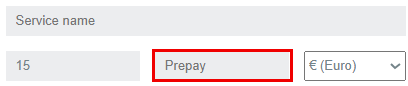
Go to Control Panel / SERVICES / edit service icon and simply leave the Prepayment field blank.
2.-ONLINE PAYMENT
This option allows you to request payment of an amount from the customer at the time of booking.
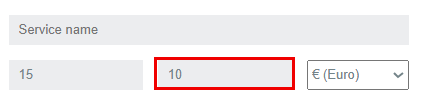
You can configure the amount you want to charge online, which can be the full price of the service or just a portion of it.
The Price field should contain the actual price of the service, while the Prepayment efield should contain the amount you want to charge online towards the service price.
3.-ALLOW THE CUSTOMER TO CHOOSE BETWEEN PAYING ONLINE OR PAYING AT THE CENTRE
If you want your customers to decide whether they want to pay online by card when booking their appointment or prefer to pay at the centre when they attend their appointment, tick the checkbox shown below and save:

The Price field should contain the actual price of the service, while the Prepayment field should contain the amount you want to charge online towards the service price.
4.-SAVE THE CUSTOMER’S CARD WITHOUT ONLINE PAYMENT
This option allows you to request the customer’s bank card details during the booking process, without making any charge at that time.
This is particularly useful for businesses that want to have a payment guarantee in case of no-shows or late cancellations.
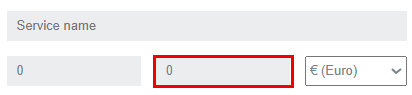
In the Price field, you can enter 0 or the actual price of the service, while in the Prepayment dfield you must enter 0 and save.
 Getting Started
 Schedule configuration
 Services Configuration
 Agendas Configuration
 Online Booking
 Manage the calendar
 Email and SMS notifications
 Holidays and blocking
 Customize sing and notifications
 Packages management
 Customers list
 Billing
 Payment gateway
 Synchronize with other calendars
 Appointment in advance and cancellation
 Confirmation of appointments
 Reports and statistics
 Worker access permits
 Validate online appointments
 Online reservations for members only
 My account information
